
Make Me a Cocktail
Make Me a CocktailFood & Drink
2.47.00 Reviews
- Version
- 3.27
- Installs
- 10.00K
- Age Rating
- Teen
Screenshots
Our Review of Make Me a Cocktail
 Analysis by Appyee
I like cocktail apps most when they help me make a sensible choice with what is already in the cupboard, rather than making every drink look like a shopping list. Make Me a Cocktail is aimed at that practical kind of experimenting: it is a free Food & Drink app from Make Me a Cocktail, with recipes and discovery tools for people who want to mix at home. Its appeal is easy to understand, though its modest user feedback makes me cautious about recommending it as everyone’s only recipe reference.
Where the app stands today
The current Android release is version 3.27, and the app is rated for Teen audiences. It has passed 10,000 installs, but its average rating is 2.4 from 27 ratings, alongside 7 written reviews. That is a mixed reception, not a verdict on every recipe or device, but it is a useful reason to try the free experience before paying for anything. Optional in-app purchases range from $4.99 to $129.99 per item, so I would check what a purchase includes and whether it suits my needs before committing.
Make Me a Cocktail was released on November 25, 2024, and version 3.27 gives users a clear current reference point. A version number by itself does not tell me which tools have changed or how smoothly they work, so I would not treat it as proof of a particular redesign or feature improvement. For someone already using the app, the practical approach is to check the installed version and see whether the screens and options they rely on still fit their routine.
What the recipe-first approach is good for
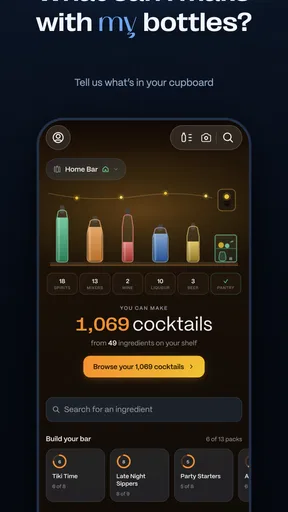
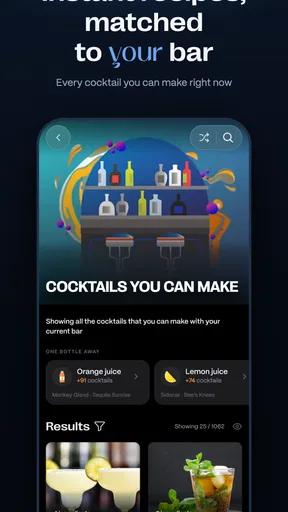
Searching by ingredients is the most useful idea here. If I have a bottle of gin, citrus and a half-used mixer, I can look for recipes that make those supplies relevant instead of browsing a general list and hoping something fits. That is especially handy before a grocery run: I can decide whether one extra ingredient would unlock a drink I actually want, rather than buying several bottles for a single recipe.
It also makes the app a better fit for casual learning than for strict bartending study. Saving a recipe I have made before can make repeat preparation quicker, while the daily pick and themed collections give me ways to explore beyond my usual order. I would treat a featured drink as a prompt, not an obligation: if its ingredients are inconvenient, a saved favorite or an ingredient search is likely to be more useful that evening.
Who should give it a try
I can see this working best for a curious home mixer who wants ideas, keeps a few spirits and mixers around, and is comfortable adjusting plans when the exact recipe is not practical. It may also help a host who wants a starting point for a small menu, especially if the group is happy with a short choice of drinks rather than a full bar selection.
It is less suitable for someone who needs a dependable, highly controlled bar-management tool, or who expects every recipe to match a particular technique, glass, or ingredient already on hand. A general web search or a trusted bartending book may be a better reference when I need to compare several established versions side by side or verify a technique in depth. The app’s low average rating also means I would keep another recipe source nearby until I knew that its search and recipe pages worked well for me.
Discovering the Perfect Blend
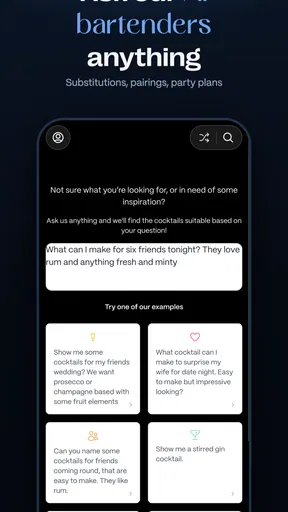
The first thing that caught my attention was the app's sleek and user-friendly interface. No more fumbling around trying to figure out where things are. As soon as you open Make Me a Cocktail, you're greeted with a search bar and a plethora of cocktail options. It’s like being handed a magical key to a universe of flavors.
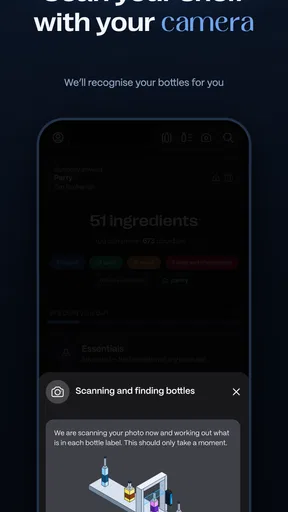
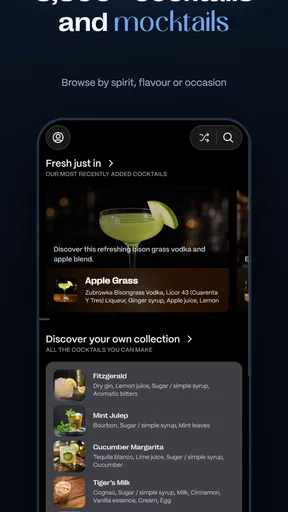
The app allows you to search for cocktails based on the ingredients you have at home. Just type in what you’ve got, and it will spit out a selection of cocktails you can whip up. It’s a lifesaver for those of us who find ourselves with a random assortment of bottles and no idea what to do with them.
A Dive into the Features
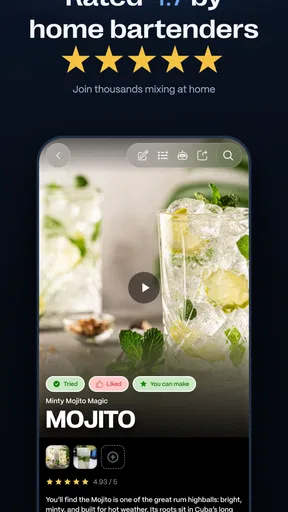
Now, let’s talk about some of the features that really stood out. One of my favorites is the ability to save your favorite recipes. This means you can come back to that killer Margarita recipe you loved last weekend without having to search for it all over again.
Another cool feature is the “Cocktail of the Day.” It’s like the app knows when you’re feeling adventurous and need a little inspiration. Each day, a new cocktail is highlighted, complete with a fun backstory and detailed recipe.
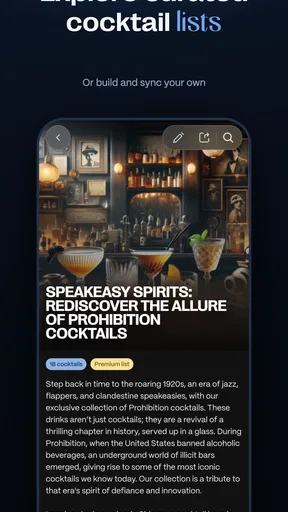
For those who are always on the lookout for something new, the app also offers collections based on themes, occasions, or even moods. Feeling tropical? There’s a collection for that. Want something to warm you up in winter? You’re covered!
Mixing it Up with Friends
Planning a get-together? The app’s party planning feature is a game changer. You can set the number of guests and the app will adjust the ingredient quantities for you. This takes the guesswork out of scaling recipes, ensuring you have enough drinks for everyone without overbuying.
Plus, there’s a community aspect to the app. Users can share their own concoctions and rate others. It’s a great way to discover variations on classic recipes or stumble upon something completely new.
Using the tools without overcomplicating the evening
For a low-key dinner, I would use the ingredient search before deciding what to serve, then save the one recipe that suits the food and the guests. That small sequence is more useful than scrolling through a long catalogue at the table. If the result calls for an ingredient I do not have, I can decide whether it is worth buying or simply choose another drink; I would not assume that an unavailable ingredient can be swapped without changing the balance.
For a gathering, the guest-count adjustment is handy as a planning aid, but I would still check the totals before shopping. Scaling a recipe can tell me the quantities implied by the app; it cannot judge how much a particular group will drink or whether everyone wants the same cocktail. I would choose one or two options, make a small test serving first, and keep water and non-alcoholic choices available. That is a more reliable workflow than preparing a large batch solely because the calculator produced a number.
How it compares with familiar alternatives
Compared with searching the web, the app’s advantage is having discovery, saved recipes, themed browsing and party scaling gathered in one cocktail-focused place. A web search can still be better when I want several independent versions of a classic or need to investigate why recipes disagree. A printed book is easier to browse without a screen and can feel more dependable for a carefully tested repertoire, while a simple notes app may be enough if I only repeat a handful of drinks.
The choice comes down to how I explore. If I like trying recipes based on what I own and want a convenient place to keep favorites, this app has a purpose beyond a static list. If I mostly make the same drink, need detailed professional instruction, or want to scrutinize sources and variations, the usual alternatives may serve me better. I would use it as an idea finder and organizer, not as the final authority on every technique or substitution.
Small habits that make it more useful
One practical tip is to search with the ingredients that define the drink first, rather than entering every garnish and pantry item. That keeps the initial search focused; I can then inspect the recipe and decide whether the extras are essential to the version I want to make. When I find a combination that works, saving it turns the next occasion into a quick revisit instead of another round of browsing.
I would also use the themed collections when I have a mood or occasion in mind but no specific recipe, and the ingredient search when I need to use up a bottle. Those are different problems, and choosing the matching route makes discovery less random. For a party, I would settle on the menu before scaling quantities; for a quiet night, I would start with what is already open. These small choices help the app fit the moment rather than letting the catalogue dictate it.
Limits worth keeping in mind
The app’s strengths depend on whether its suggestions and recipe details suit the way I mix. A recipe can be appealing on screen yet impractical if it requires a specialty bottle I will rarely use. I would treat the displayed ingredients as a shopping and preparation guide, not assume that every suggested drink is a good use of what I own. The ability to save favorites is helpful, but it does not remove the need to judge taste, balance and serving size for myself.
The rating is another reason to keep expectations measured. With a small number of ratings and a low average, I would test the parts I care about—searching, opening a recipe, saving it and adjusting a party quantity—before building my routine around them. That is not a claim that those tools fail; it is simply a sensible way to assess an app whose public reception is mixed. If the experience feels awkward on my phone, a browser search or a trusted book is an easy fallback.
What I would check before settling in
New users may reasonably wonder whether they need to pay to make the app worthwhile. It is free to start, while optional purchases are available, so I would explore the free experience first and only consider a purchase after confirming exactly what it unlocks in the current version. The listed purchase range is broad enough that I would never tap through a payment screen casually.
Someone planning drinks for a group may also wonder whether the app can handle quantities. The party-planning tool adjusts ingredient amounts to a chosen guest count, which is useful arithmetic, but I would still scale cautiously and account for people’s different preferences. And for anyone asking whether it is only for experienced cocktail fans, the ingredient-led discovery and collections make it approachable for curious beginners; the best results still come from reading each recipe carefully and being willing to choose a simpler option when supplies are limited.
My recommendation
All in all, Make Me a Cocktail is more than just an app; it’s a mixologist’s toolkit in your pocket. Whether you’re a cocktail newbie or a seasoned pro, there’s something here for everyone. The app is available for both Android and iOS, so no one’s left out of the fun.
If you’re curious about exploring the world of cocktails, or just want to impress your friends with your newfound bartending skills, give this app a try. You might just find it’s the missing ingredient in your social life!
Verdict
Strengths of Make Me a Cocktail
- Extensive cocktail database for all occasions.
- User-friendly interface for easy navigation.
- Personalized cocktail recommendations.
- Offline access to saved recipes.
- Regular updates with new cocktail ideas.
Limitations of Make Me a Cocktail
- Limited non-alcoholic options available.
- Requires account for saving favorites.
- Some advanced features are paid.
- Occasional ads can be intrusive.
- No video tutorials for recipes.
Similar Picks in This Category
View All
Rappi: Food Delivery, Grocery
Rappi, Inc - Delivery3.5

McDonald’s: Cupons e Delivery
Arcos Dorados4.3

Swiggy: Food Instamart Dineout
Swiggy4.7

Blinkit: Groceries & more
Blinkit4.8

foodpanda: food & groceries
Foodpanda GmbH a subsidiary of Delivery Hero SE4.0

Zomato: Food Delivery & Dining
Zomato4.7
Frequently Asked Questions
What is Make Me a Cocktail and how does it work?
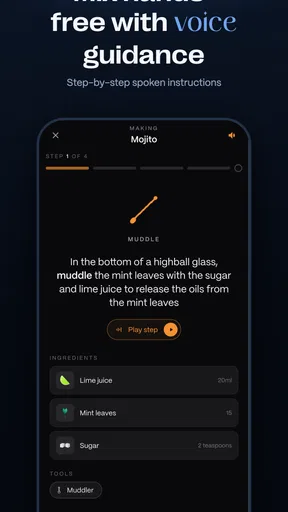
Make Me a Cocktail is a comprehensive cocktail recipe app that allows users to discover and create a wide variety of cocktails. By inputting the ingredients you have at home, the app suggests cocktails you can make. It also offers detailed recipes, step-by-step instructions, and user reviews to help enhance your mixology skills.
Is Make Me a Cocktail free to use, or does it require a subscription?
The app is free to download and offers a variety of features at no cost. However, there is a premium subscription available that unlocks additional features such as more exclusive recipes, advanced search filters, and an ad-free experience. Users can choose whether the extra features are worth the subscription price.
Can I use Make Me a Cocktail offline?
Yes, Make Me a Cocktail offers offline capabilities. Once you've downloaded recipes or saved your favorite cocktails, you can access them without an internet connection. This is particularly useful for users who want to use the app in areas with limited connectivity, such as while traveling.
How does Make Me a Cocktail ensure the accuracy of its recipes?
The app sources its recipes from a combination of professional bartenders and user submissions. Each recipe is reviewed and tested for accuracy before being added to the app. Additionally, users can rate and comment on recipes, providing community-driven feedback to ensure quality and consistency.
Does Make Me a Cocktail allow for customization of cocktail recipes?
Yes, the app provides users with the ability to customize cocktail recipes to suit individual tastes. Whether you wish to adjust ingredient quantities or substitute ingredients based on availability, the app offers flexibility. It also allows you to save these custom recipes for future reference, making it a versatile tool for home bartenders.
